Template in.
PDF, email or prompt out.
Turn Dynamics 365 and Dataverse records into invoices, quotes, statements, labels and emails, plus clean context for Copilot. Business teams design them visually, developers extend them in code, and every document is formatted in the recipient’s language and currency.
// Data arrives as data.json from Dataverse
#import "@local/brc:1.2.0"
#let data = json("data.json")
#show: brc.document

#brc.header(title: [Invoice], meta: (
  ("Invoice", data.invoicenumber),
  ("Date", brc.date(data.createdon))))
#brc.parties(("Billed to", brc.address(data.customer)))

#brc.line-items(data.lines, columns: (
  (field: "productdescription", width: 1fr),
  (field: "quantity", align: "right"),
  (field: "extendedamount", align: "right")))
#brc.totals((), total: ("Total due", data.totalamount_label))
Schema synced·Rendered in about a second| Description | Qty | Amount |
|---|---|---|
| Navigation radar calibration | 1 | 1,850.00 |
| Rigging overhaul | 1 | 3,420.00 |
| Transponder certification | 2 | 680.00 |
- Microsoft DataverseManaged solution
- Dynamics 365Sales, Field Service
- Power AutomateConnector
- Copilot StudioPrompt context
From Dataverse record to finished document in three steps
No XML schemas to maintain. No SSRS report formatting.
- 01
Bind your data
A query builder across your tables resolves lookups, choices and child rows. No FetchXML to write.
- 02
Design the template
Visual blocks for most people. Typst and Liquid with autocomplete and a live preview for developers.
- 03
Render anywhere
From a button, a flow, a plug-in or the API. Save to the record, to SharePoint or send by email.
No code required
Sales operations, finance and service teams build and send their own documents, inside Dynamics 365.
Design with the visual designer
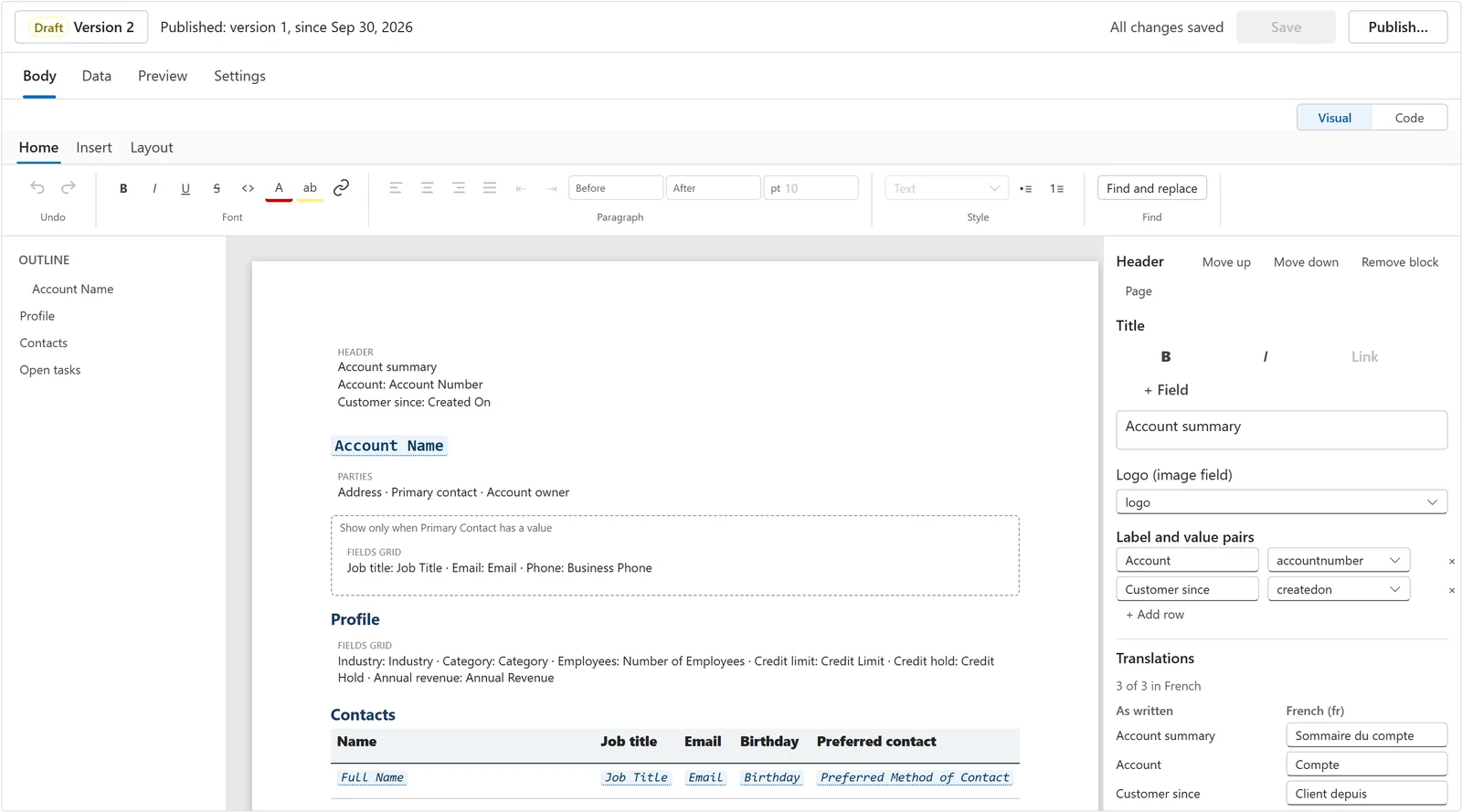
Headers, field grids, tables and conditional sections are blocks you add, move and style from a ribbon, the way you would in Word. Pick fields from your tables, add French or other translations, and switch to code only if you want to.
- Outline, page canvas and block properties side by side
- Fields, tables and show-when conditions without code
- The same template opens in Code for developers
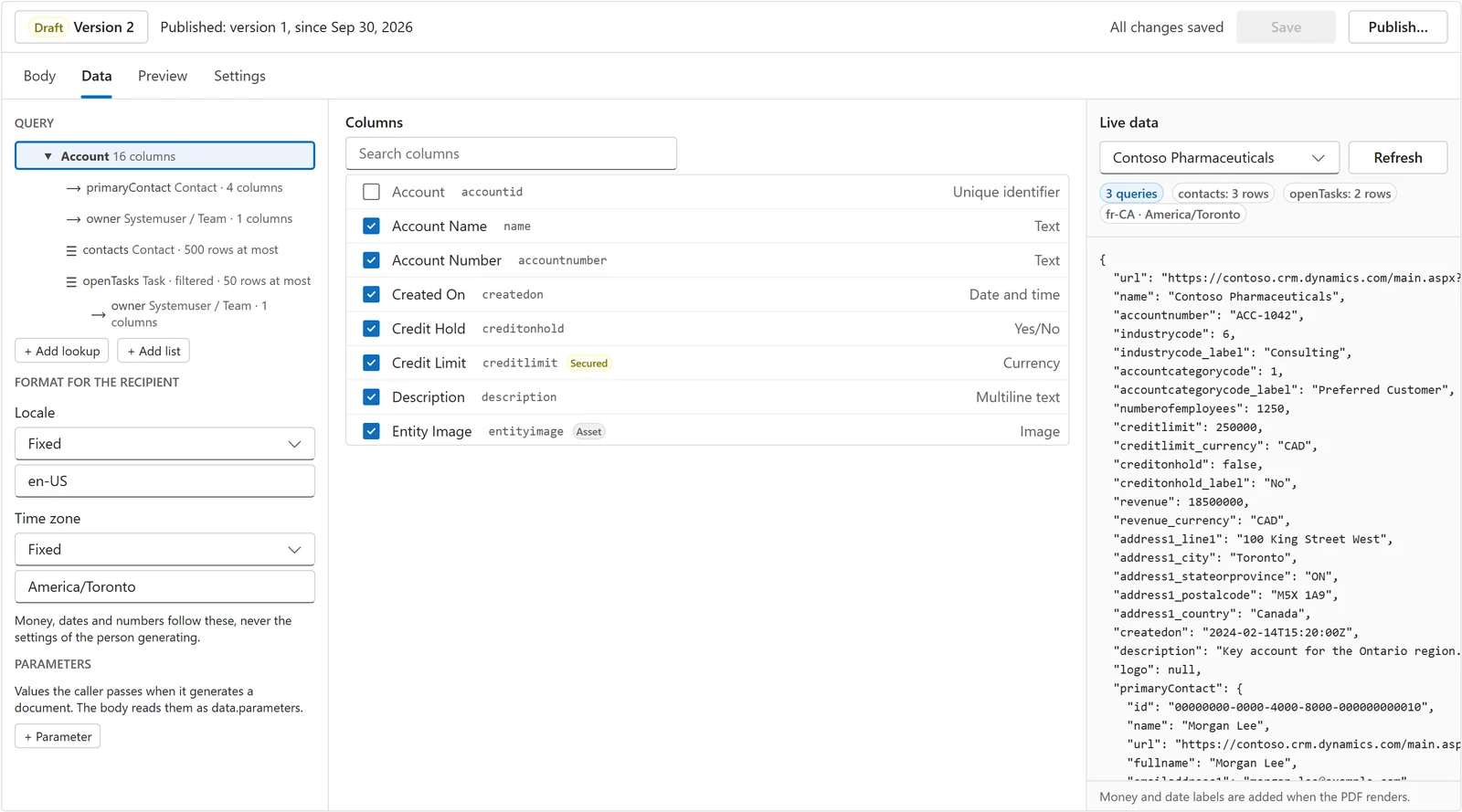
Choose your data with the query builder
Start from the bound table, then add lookups and related lists such as the primary contact, contacts or open tasks. Tick the columns you need, filter and cap lists, and see the exact data the template will get from a real record.
- Lookups and related lists as a tree, no FetchXML
- Column picker that flags secured fields and images
- Live data from a record, with locale and time zone for the recipient
Generate from the record
A button on the form or the grid. Select rows and get one PDF or a document each, saved to the record or emailed.
Describe it, get a draft
The AI composer drafts a template from a sample record. You review the changes and accept the ones you want.
One template engine. Three outputs.
PDF documents
Invoices, quotes, statements, work orders and mailing labels, typeset with Typst. Page numbers, headers, footers and QR codes.
- Multi-page and multi-record
- Avery label stocks built in
- Merge several renders into one PDF
HTML emails
Responsive emails from Liquid and MJML that hold up in Outlook and on phones. Preview them in the editor before you send.
- MJML layout with inlined CSS
- Plain-text version included
- Liquid loops and conditions
Prompt context
Clean Markdown or text from a record for Copilot Studio and your own agents, so the model sees exactly the fields you chose.
- Same query builder, same templates
- Markdown or plain text
- Only the fields you choose
Built for Power Platform professionals
Everything a consultancy or in-house team needs to run document workflows in production.
AI composer
Draft Typst and Liquid templates from a plain-language description and a sample record. Changes arrive as a diff you accept, and only ever on a draft.
Starter gallery
Invoice, quote, statement, work order, mailing labels, notification email and Copilot prompt context, ready to bind to your tables.
Batch PDFs and label sheets
Thousands of statements or a full label run from any model-driven view.
Your data stays in Dataverse
The renderer is stateless. Templates, data and output are never stored or logged.
Dev to prod
Templates move between environments as packages. A command-line tool exports, validates and imports them, so dev, test and prod stay in step.
Versions and scheduled publishing
Published versions never change. Edit a draft, preview it against real records and publish it when it’s ready, or on a date you choose where your plan includes scheduling.
Your data stays under your control
Built for the questions an infosec review asks first.
Stateless rendering
Templates, data and output are processed in memory and never stored, logged or forwarded. Telemetry records timing, sizes and IDs only.
Runs as the calling user
Data is read by plug-ins inside Dataverse with the caller’s roles and field security. People only render what they can already see.
Canada and US regions
Hosted on Microsoft Azure, with Canada as the primary region and the United States as the second. Subprocessors are listed on the security page.
Dynamics expertise from the people who build Bracecast
Bracecast’s founders have delivered Microsoft Dynamics projects for 20 years, from early Dynamics CRM to Dynamics 365 and Power Platform. Besides the product, we offer consulting for Dynamics 365 and Power Platform teams.
Document migration
We move your Word templates, SSRS reports and email templates to Bracecast, and check every output against the original before you switch.
Dynamics 365 and Power Platform consulting
Solution design, data models, security roles, plug-ins, Power Automate flows and PCF controls, from a first workshop to go-live.
Integrations, upgrades and reviews
Connect Dataverse to your other systems, move from on-premises to online, or get an independent review of an existing implementation.
Frequently asked
- What is Bracecast?
- Bracecast is a Microsoft Dataverse managed solution that turns Dataverse records into PDFs, HTML emails and Markdown or text. It replaces Word templates and SSRS reports for transactional documents such as quotes, invoices, work orders and notifications.
- Do business users need to write code?
- No. The visual designer builds documents from blocks and fields picked from your tables, and the Generate document pane creates them from a form or a grid selection. Developers can switch any template to Typst or Liquid code.
- Do you store or log our data or templates?
- No. Your templates and data stay in your Dataverse environment. When a document is made, the plug-in sends the renderer only that template and that document’s data. The renderer processes them in memory and returns the result. Our servers never store or log templates, data or rendered documents, during processing or after it. Telemetry records only timing, sizes and IDs.
- Can we keep processing in our region?
- Yes. Each Dataverse environment is connected to one Bracecast region during setup, and its documents are rendered only in that region. Canada is the default, with failover between Canada Central and Canada East so processing stays in Canada. Plans that include a choice of region can use the United States instead, and we plan to add an EU region as demand grows. The optional AI composer is the one exception: its requests go to our AI provider in the United States.
- Do you offer consulting?
- Yes. The Bracecast team has 20 years of Microsoft Dynamics experience, and we offer consulting for Dynamics 365 and Power Platform, from document migration to solution design and integrations. Email sales@bracecast.io.
Retire your Word templates and SSRS reports.
Early access is open to Dynamics consultancies and in-house Power Platform teams. Tell us which documents you need, and we’ll help you set up the first ones.